Transform Your iPad Art with Realistic Snow Procreate Brushes
Capturing the Magic of Winter in Your Digital Art
Adding snow to a digital illustration can be tricky. It’s more than just white dots on a canvas; it involves depth, texture, and atmosphere. If you have ever struggled to paint realistic falling snow or create a cozy winter wonderland scene, you know that standard brushes often fall flat. They look mechanical, repetitive, or lack the soft, organic feel of real snowflakes. This is where dedicated design assets become essential for any serious creative professional.
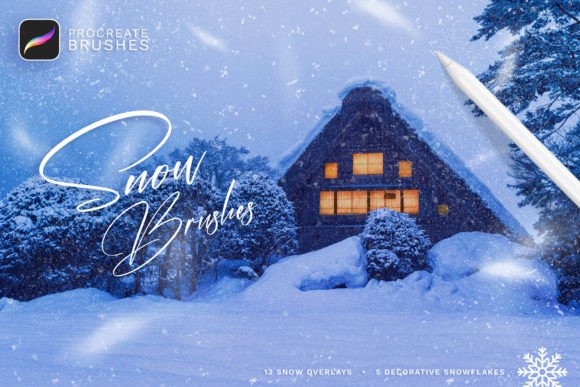
The Snow Procreate Brushes set is specifically engineered to solve this problem for iPad artists. It isn't just a collection of white splatters; it is a comprehensive toolkit designed to mimic the behavior of snow in various states. Whether you are creating a gentle flurry for a holiday greeting card or a blizzard for a dramatic book cover, these brushes provide the necessary range. The collection includes 18 distinct Procreate brushes, 13 snow overlay brushes, and 5 decorative snowflakes, giving you a full spectrum of winter effects without the hassle of manual painting.
Practical Features for Professional Results
One of the standout features of this collection is its reliance on pen pressure sensitivity. As a designer or illustrator, you understand that control is everything. Because these brushes are pressure-sensitive, you can vary the density and size of the snow simply by adjusting how hard you press on your Apple Pencil. This creates a much more natural flow compared to static stamps. It allows for a personalized touch that distinguishes professional work from amateur attempts.
The versatility of the Snow Procreate Brushes extends beyond simple weather effects. Here is how different creative professionals can utilize this set:
- Illustrators and Children’s Book Artists: Create immersive winter scenes that feel alive. The realistic snow brushes help establish a mood instantly, making the environment a character in itself.
- Graphic Designers and Brand Strategists: During the holiday season, brands need seasonal updates. Use these brushes to quickly add festive flair to social media graphics, email headers, and website banners, ensuring brand identity remains fresh and relevant.
- Content Creators and Bloggers: Elevate your photography or digital layouts. The snow overlay brushes are perfect for adding a subtle, textured layer to images without obscuring the subject matter.
- Scrapbookers and Hobbyists: Add decorative elements to digital journals or printable planners. The 5 included decorative snowflakes are ideal for embellishing borders and margins.
Seamless Integration and Ease of Use
Time is a valuable commodity for entrepreneurs and marketers. You cannot afford to spend hours configuring new tools. The installation process for these design assets is streamlined for efficiency. Once you download the file on your iPad, simply clicking on "Snow_[by_Sko4].brushset" triggers Procreate to automatically install the entire collection. They appear instantly at the top of your brush list, ready for immediate application.
It is important to note the compatibility of this product. These brushes are designed exclusively for the Procreate application on Apple iPad. They are not compatible with Adobe Photoshop, Affinity Photo, or other desktop graphic editing software. This specificity ensures that the brushes are optimized for the iPad’s hardware and the Procreate engine, resulting in smooth performance and high-quality rendering.
Visual Impact and Style
The visual appeal of the Snow Procreate Brushes lies in their realism. Many digital art tools suffer from a "plastic" look, but this set focuses on organic textures. The snow overlays provide depth, allowing you to place snow in the foreground, midground, and background of your canvas. This capability is crucial for visual hierarchy; it guides the viewer's eye through the composition. By layering these brushes, you can manipulate the perception of space, making a flat illustration feel three-dimensional.
Furthermore, the decorative snowflakes offer a stylistic counterpoint to the realistic overlays. While the overlays handle the atmosphere, the decorative elements handle the design. They are excellent for packaging design or editorial design where you need recognizable snowflake shapes that are clean and vector-like in appearance, yet possess a hand-drawn charm.
Enhancing Brand Identity and Audience Engagement
For small business owners and publishers, seasonal marketing is a key driver of engagement. Incorporating high-quality winter elements into your brand identity during the colder months can significantly boost audience connection. However, using low-quality graphics can cheapen the perception of your brand. Using premium assets like the Snow Procreate Brushes signals professionalism and attention to detail.
Consider a coffee shop owner creating a digital menu for a seasonal latte. Adding a realistic, soft snow overlay to the background image of the drink immediately evokes warmth and coziness. For a web design project, using these brushes to create custom header images ensures that the site feels unique and curated, rather than relying on generic stock photos that competitors might also use.
Tips for Best Practices
To get the most out of your Snow Procreate Brushes, consider the following practical advice:
- Layer Management: Always paint snow on separate layers. This allows you to adjust the opacity of the snow independently of your main subject. You can also use clipping masks to confine the snow to specific areas of your illustration.
- Color Theory: Snow is rarely pure white. Depending on the lighting in your scene, your snow should lean towards light blues, purples, or even pinks during a sunset. Experiment with the hue of the brushes to match the ambient light of your project.
- Font Pairing: If you are using these brushes for social media graphics or invitations, pair them with a complementary typeface. A clean sans serif font or a playful script font works well against the organic texture of snow. Avoid overly complex serif fonts that might get lost in the snow texture.
Ultimately, the Snow Procreate Brushes set is more than just a collection of stamps; it is a utility for storytelling. It provides the tools necessary to build atmospheric depth and seasonal charm with ease. Whether you are a hobbyist looking to spruce up a personal project or a professional designer working on a commercial campaign, these brushes offer a reliable, high-quality solution for capturing the beauty of winter on your iPad.